Have you noticed a sudden drop in your website traffic? Are your most valuable pages no longer appearing where they used to in Google Search? If so, you’re probably wondering how to recover lost Google rankings before the decline. Google processes billions of searches every day, making even a small ranking decline capable of affecting a business’s visibility and revenue.
At SEO Services in Lagos, we’ve seen businesses lose valuable organic traffic for reasons ranging from simple technical errors to major content quality issues. In many cases, these problems are completely fixable once they’re identified.
Below is a proven step-by-step process to recover lost Google rankings. Let’s start by confirming whether your rankings have actually declined.
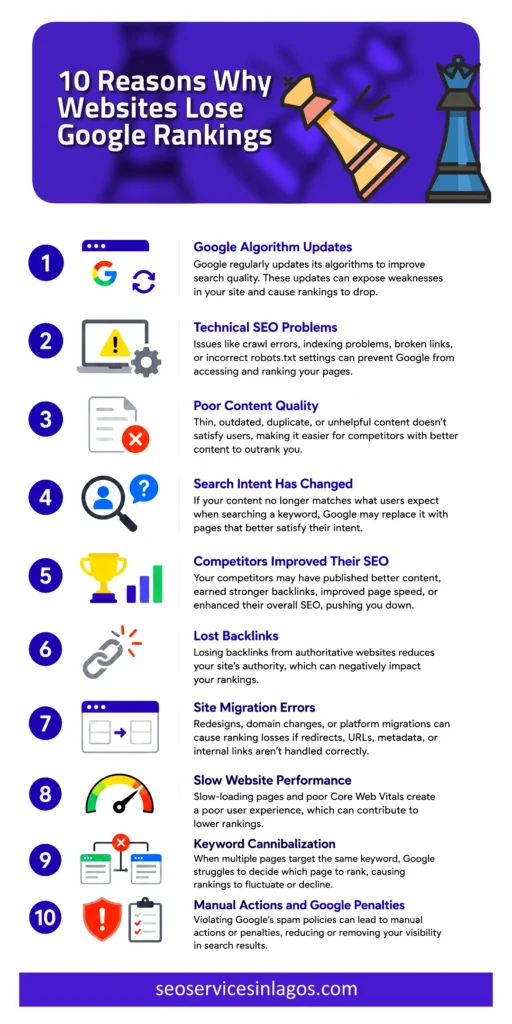
Why Websites Lose Google Rankings
There isn’t a single reason websites lose visibility.
Usually, several factors work together to reduce your rankings.
Below are the most common causes of SEO ranking drops.
1. Google Algorithm Updates
Google regularly updates its ranking systems to improve search quality.
Some updates target helpful content, spam, link manipulation, product reviews, search quality, and user experience.
In our experience, businesses often blame Google algorithm updates when rankings fall. However, algorithm updates rarely create problems on healthy websites. More often, they expose existing weaknesses such as outdated content, technical SEO issues, or pages that no longer satisfy search intent.
2. Technical SEO Problems
Technical issues can prevent Google from properly crawling, indexing, or understanding your website.
During one technical SEO audit for a cleaning business, we discovered that a plugin update had accidentally added a noindex directive to several key service pages. After removing the directive and requesting reindexing through Google Search Console, impressions began recovering over the following weeks.
3. Poor Content Quality
Google rewards content that genuinely helps users.
Unfortunately, many websites still publish thin content, duplicate content, keyword-stuffed articles, outdated information, and AI-generated content with little human oversight.
If your pages no longer satisfy searchers, Google may gradually replace them with more useful alternatives.
4. Search Intent Has Changed
Google’s understanding of search intent evolves over time.
For example, someone searching for “best CRM software” today may expect product comparisons, pricing, video demonstrations, and real user reviews.
If your page still provides only a brief definition, it no longer satisfies user expectations.
Even without technical issues, failing to match search intent can lead to a Google ranking drop without warning.
5. Competitors Improved Their SEO
Sometimes your website hasn’t become worse.
Your competitors have simply become better.
They may have:
- Published more comprehensive content.
- Improved page speed.
- Earned stronger backlinks.
- Added structured data.
- Improved internal linking.
- Built greater topical authority.
SEO is competitive.
Standing still often means falling behind.
That’s why regular competitor analysis should be part of every SEO strategy.
6. Lost Backlinks
High-quality backlinks remain one of Google’s strongest ranking signals.
However, backlinks naturally disappear over time because websites remove pages, domains expire, content gets updated, and links become broken.
Losing authoritative backlinks can reduce your rankings, especially if competitors continue earning new ones.
7. Site Migration Errors
Website redesigns and platform migrations frequently cause ranking losses.
Common migration mistakes include missing redirects, changed URLs, deleted pages, broken internal links, incorrect canonicalisation, and lost metadata.
If your website lost Google rankings overnight immediately after a redesign, migration errors should be among the first areas you investigate.
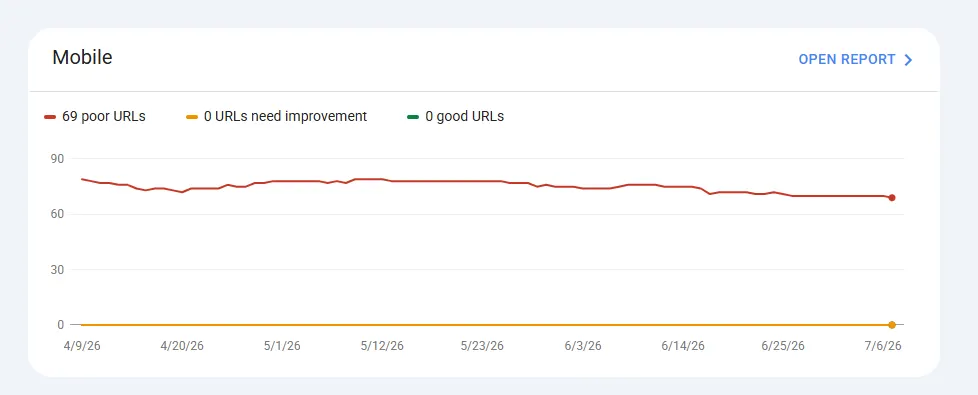
8. Slow Website Performance
Google increasingly rewards websites that provide excellent user experiences.
Poor performance can affect both rankings and conversions.
Pay attention to Core Web Vitals, slow page speed, large images, excessive JavaScript, and poor mobile performance.
Although page speed alone rarely causes dramatic ranking losses, it can contribute when combined with other weaknesses.
9. Keyword Cannibalization
Sometimes multiple pages compete for the same keyword.
This issue, known as keyword cannibalization, confuses Google because it struggles to determine which page deserves to rank.
As a result:
- Rankings fluctuate.
- Pages replace one another.
- Neither page performs particularly well.
Consolidating similar pages often improves overall visibility.
10. Manual Actions and Google Penalties
Although less common today, websites can still receive manual actions for violating Google’s guidelines.
Examples of actions that invoke penalties are spam, cloaking, hidden text, unnatural backlinks, and thin affiliate pages.
Check the Manual Actions report in Google Search Console.
If Google has penalised your site, you’ll usually receive a notification explaining the issue.
How We Diagnose Ranking Drops at SEO Services in Lagos
Every recovery project begins with a structured investigation rather than assumptions. Before recommending any fixes, we typically review:
- Google Search Console data
- Google Analytics trends
- crawlability and indexing
- Core Web Vitals
- internal linking
- recent website changes
- backlink profile
- keyword movements
- competitor performance
- Google algorithm timelines
This process helps us identify the actual cause of a ranking decline before making changes that could worsen the problem.
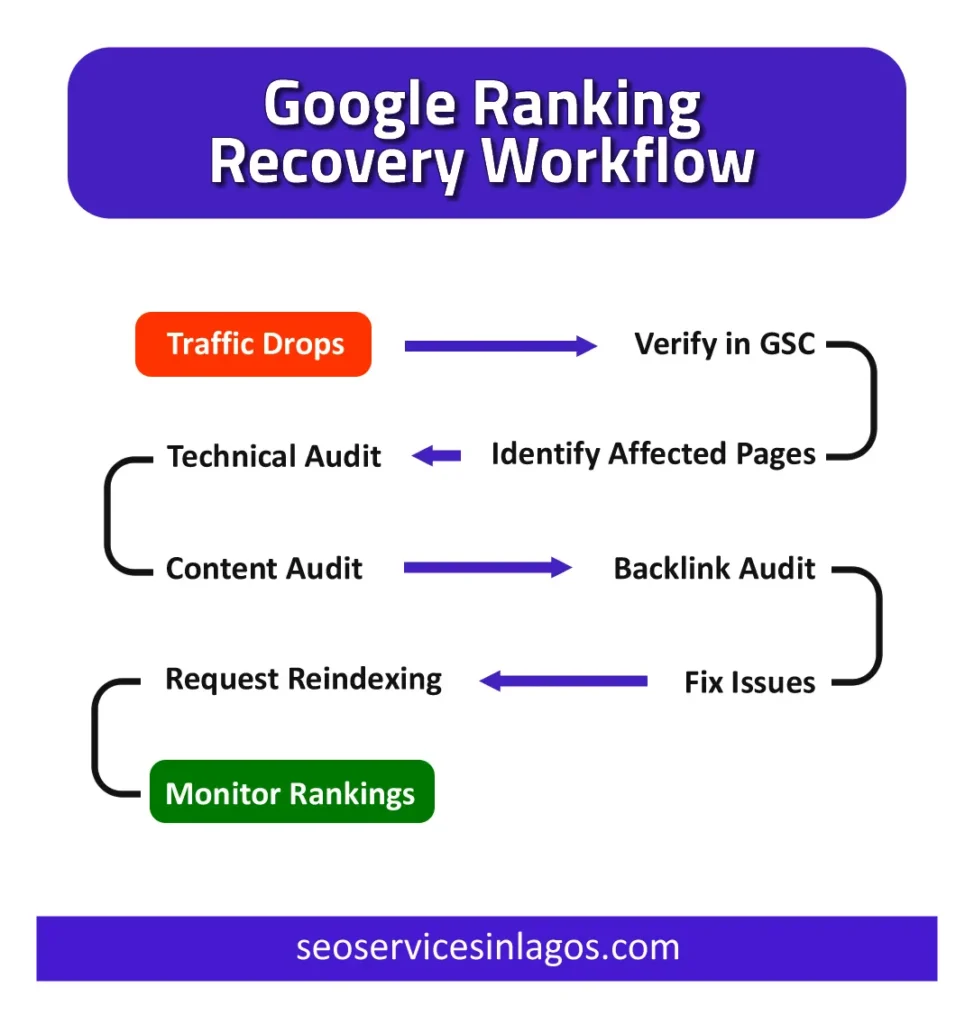
After diagnosis, the following steps form the same framework we use when helping businesses recover from a Google ranking recovery project.
Step 1: Identify the Pages That Lost Rankings
Don’t assume your entire website has been affected.
Instead, determine exactly which pages experienced a decline.
Using Google Search Console, compare recent performance against a previous period and identify:
- Pages with fewer clicks
- Pages with fewer impressions
- Keywords that dropped in average position
- Pages that have stopped receiving organic traffic
Create a spreadsheet listing:
- URL
- Primary keyword
- Previous ranking
- Current ranking
- Organic traffic before the decline
- Organic traffic after the decline
This gives you a clear recovery roadmap instead of forcing you to fix every page unnecessarily.
Step 2: Investigate Google Search Console for Errors
Next, look beyond the Performance report.
Review the following sections inside Google Search Console:
- Indexing report – Check whether Google is still indexing your important pages. Look for issues such as Crawled – currently not indexed, Discovered – currently not indexed, Duplicate pages, Alternate pages with canonical tags, and Excluded URLs.
- Pages removed by mistake – Sometimes website owners accidentally block Google after redesigning the site, installing a plugin, changing CMS settings, or editing the robots.txt file. Check for noindex tags, blocked resources, and robots exclusions.
- Manual actions – Visit the Manual Actions section. If Google has taken action against your website, you’ll find details here. Fortunately, manual actions are relatively uncommon. Most Google ranking drop cases are caused by technical or content issues instead.
- Security issues – Malware or hacked pages can dramatically affect rankings. Review Google’s Security Issues report to confirm your website hasn’t been compromised.
Step 3: Review Any Recent Changes to Your Website
Many ranking drops happen immediately after website changes.
Ask yourself these questions.
Did you recently:
- redesign your website?
- migrate to a new domain?
- change your URL structure?
- install a new plugin?
- update your CMS?
- delete pages?
- modify your navigation?
- switch hosting providers?
Even a seemingly harmless update can create significant SEO problems.
For example:
A redesigned website might accidentally remove heading tags, structured data, or internal links.
Similarly, changing URLs without implementing proper redirects can erase years of accumulated SEO value.
If your Google search ranking dropped shortly after a website update, investigate those changes before assuming Google penalised your site.
Step 4: Perform a Comprehensive Technical SEO Audit
Technical issues often prevent Google from properly crawling and understanding your website.
A complete technical SEO audit should examine every major ranking factor.
- Check crawlability – Google cannot rank pages it cannot crawl. Look for blocked URLs, crawl loops, redirect chains, broken navigation, and inaccessible JavaScript resources.
- Review your XML sitemap – Your XML sitemap should contain only important, indexable pages. Remove redirected URLs, deleted pages, duplicate pages, and noindexed pages. Then submit the updated sitemap through Google Search Console.
- Inspect canonical tags – Incorrect canonical tags frequently cause ranking issues. Ensure every canonical URL points to the preferred version of the page. Otherwise, Google may index the wrong page or ignore the page you actually want to rank.
- Find broken links – Broken links create poor user experiences and waste crawl budget. Check for broken internal links, broken external links, missing images, and 404 pages. Repairing these issues strengthens your site’s overall health.
- Improve Core Web Vitals – Google considers user experience when evaluating websites. Review your Core Web Vitals, including Largest Contentful Paint (LCP), Interaction to Next Paint (INP), and Cumulative Layout Shift (CLS). Improving these metrics won’t instantly restore rankings, but they remove technical obstacles that could be holding your website back.
- Evaluate mobile usability – More than half of searches happen on mobile devices. Your website should display correctly on smartphones, load quickly, use readable fonts, have tappable buttons, and avoid intrusive pop-ups.
- Check structured data – Implementing structured data helps Google better understand your pages. Review your organisation schema, local business schema, FAQ schema, article schema, and breadcrumb schema. Schema markup strengthens Google’s understanding of your content and may improve your search appearance.
Step 5: Refresh and Improve Your Content
Google wants to recommend the most relevant and useful pages available.
Instead of creating new articles, improve your existing pages.
Start by asking:
- Is this information still accurate?
- Does it fully answer the searcher’s question?
- Is there newer data available?
- Have competitors created better resources?
Refreshing content is often one of the fastest ways to recover SEO rankings.
- Update outdated information – Review every section carefully. Replace outdated statistics, obsolete screenshots, broken references, discontinued products, and expired offers.
- Improve search intent alignment – Search your target keyword again and examine the top-ranking pages. Ask yourself:
- Are competitors writing longer guides?
- Are users expecting videos?
- Do ranking pages include FAQs?
- Are comparison tables common?
Your page should satisfy the same intent while providing additional value.
- Strengthen EEAT signals – Google increasingly rewards content demonstrating Experience, Expertise, Authoritativeness, and Trustworthiness. Improve your content by adding author biographies, professional credentials, original insights, real examples, case studies, supporting evidence, and trustworthy references.
- Remove thin and duplicate content – Duplicate content makes it harder for Google to determine which version should rank. Where appropriate, merge similar pages, expand weak articles, remove unnecessary duplicates, and redirect obsolete URLs.
- Optimise without keyword stuffing – As you update your content, naturally include relevant phrases. However, always prioritise readability. Google rewards content written for people, not search engines.
At SEO Services in Lagos, content refreshes combined with technical improvements have helped businesses regain visibility without rebuilding their websites from scratch. In many cases, updating high-value pages produces faster results than publishing dozens of new articles.
Step 6: Improve Your EEAT Signals
Google wants to rank pages that demonstrate Experience, Expertise, Authoritativeness, and Trustworthiness (EEAT), especially for topics that influence financial decisions, health, legal matters, or major purchases.
While EEAT isn’t a direct ranking factor, it influences how Google’s systems evaluate the overall quality and credibility of your content.
- Show real experience – Don’t just explain SEO concepts. Demonstrate that you’ve applied them successfully. For example, instead of saying: “Technical SEO can improve rankings.”
Share an example such as:
“We recently helped a Nigerian business recover lost organic visibility after identifying blocked pages in their robots.txt file and resolving crawl issues. Within weeks, Google reindexed the affected pages, and organic traffic began recovering.”
- Add author information – Every important article should clearly identify who wrote it. Include author name. professional biography, years of experience, relevant certifications, and links to professional profiles where appropriate. This reassures both readers and search engines that the content comes from a qualified source.
- Support your claims – Whenever possible, support important statements with industry research, official Google documentation, statistics, original screenshots, case studies, and real examples. Reliable evidence strengthens your authority.
- Keep content updated – SEO changes continuously. Review your important articles every few months to ensure they still reflect Google’s latest recommendations and current best practices. Content freshness helps prevent content decay, one of the overlooked causes of declining rankings.
Step 7: Restore and Build High-Quality Backlinks
Even the best content struggles to rank without authority.
One common reason websites experience lost keyword rankings is that they’ve lost valuable backlinks while competitors continue acquiring new ones.
Begin by auditing your backlink profile.
Look for lost backlinks, broken backlinks, links pointing to deleted pages, toxic backlinks, and new backlinks earned by competitors.
If valuable backlinks now point to pages that return a 404 error, redirect those URLs to the most relevant alternatives.
This helps preserve link equity.
Instead of buying backlinks—which violates Google’s guidelines—focus on earning them naturally.
Consider;
- Publishing original research
- Creating comprehensive guides
- Producing useful tools
- Writing industry reports
- Guest posting on reputable websites
- Building relationships with industry publications
- Quality matters far more than quantity.
A few authoritative backlinks often provide greater value than hundreds of low-quality links.
Step 8: Strengthen Your Internal Linking
Many businesses underestimate the importance of internal linking.
However, internal links help Google discover pages, understand website structure, distribute authority, and identify topic relationships.
They also help visitors navigate your website more easily.
Link related pages together
For example, this article you are reading should naturally link to supporting resources such as:
Why Google Is Not Indexing Your Website
Technical SEO Services
SEO Audit Services
Local SEO Services
This creates topical authority while helping search engines understand the relationship between your content.
Use descriptive anchor text
Instead of generic phrases like:
- Click here
- Read more
Use descriptive anchor text such as:
- technical SEO audit
- recover lost organic traffic
- SEO audit services
- Google Search Console
Descriptive anchors provide additional context for both users and search engines.
Step 9: Compare Your Content with Current Top-Ranking Pages
Google’s search results evolve constantly.
The page that ranked first two years ago may no longer satisfy today’s search intent.
Search your primary keyword and carefully analyse the current top-ranking pages.
Ask yourself:
“If I were searching this keyword today, would I genuinely choose my page over these competitors?”
If the answer is no, identify what your competitors do better.
Perhaps they include better visuals, original research, more detailed explanations, better formatting, helpful FAQs, and interactive elements.
Don’t copy competitors.
Instead, create something more useful.
Google rewards pages that provide the best answer—not simply the longest article.
Step 10: Request Google to Reindex Important Pages
After making meaningful improvements, encourage Google to revisit your pages.
Inside Google Search Console:
- Inspect the updated URL.
- Confirm it is indexable.
- Click Request Indexing.
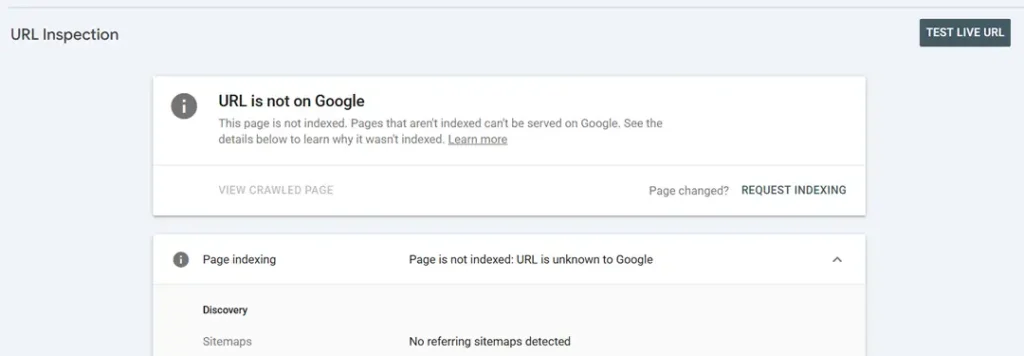
Although this doesn’t guarantee immediate reindexing, it often speeds up Google’s discovery of significant improvements.
Continue monitoring rankings, clicks, impressions, and organic traffic.
Avoid making additional major changes immediately afterwards.
Give Google time to process your updates.
How Long Does Google Ranking Recovery Take?
One of the most common questions business owners ask is:
“How long does it take to recover lost rankings?”
The honest answer is:
It depends on the underlying cause.
Here are some general expectations.
| Cause | Typical Recovery Time |
| Minor technical issue | A few days to several weeks |
| Content improvements | 4–12 weeks |
| Lost backlinks | Several months |
| Site migration issues | 1–3 months |
| Major algorithm-related recovery | Several months |
| Manual actions | Varies after reconsideration approval |
SEO ranking recovery is rarely instant.
Even after implementing all the right changes, Google needs time to recrawl your pages, reprocess your content, evaluate user signals, and compare your site with competitors.
This is why patience matters.
When Should You Hire an SEO Expert?
Some ranking drops are easy to resolve.
Others require technical expertise and specialised tools.
Consider hiring an SEO professional if:
- Your website ranking dropped dramatically.
- Organic traffic has continued declining for several months.
- You cannot identify the cause.
- Your website has experienced a failed migration.
- You suspect a technical SEO issue.
- Your pages are no longer being indexed.
- You depend on organic search for leads or sales.
- Previous recovery attempts haven’t worked.
At SEO Services in Lagos, we help businesses diagnose the real causes of ranking losses rather than applying generic fixes.
Our SEO audits examine every aspect of your website.
Based on our findings, we develop a customised recovery strategy designed to restore your visibility, improve your organic traffic, and position your website for long-term growth.
If you’ve been wondering why your website is losing rankings or need expert help to recover from a Google algorithm update, we’re here to help.
FAQs About Google Ranking Recovery
How do I know if Google penalised my website?
Check the Manual Actions report in Google Search Console. If Google has applied a manual penalty, you’ll receive a notification explaining the issue. Most ranking drops, however, are not caused by penalties.
Does updating content improve rankings?
Yes. Refreshing outdated information, improving search intent alignment, strengthening EEAT signals, and expanding thin content can significantly improve rankings over time.
Should I redesign my website after losing rankings?
Not necessarily. A redesign without addressing the real cause may worsen the problem. Always diagnose the issue first before making significant structural changes.