Many business owners register a Google Business Profile, yet they still struggle to appear in local search results. As a result, potential customers cannot find your location, call your business, or request directions. This means lost leads, fewer enquiries, and missed sales opportunities.
The good news is that there is usually a reason your business isn’t appearing. More importantly, most of these issues can be fixed with the right Google Business Profile optimisation and Google Maps SEO strategy.
There is rarely just one reason why a Google Business Profile is not showing. Instead, several factors work together to determine whether your business appears in Google Maps.
Let’s examine the most common causes.
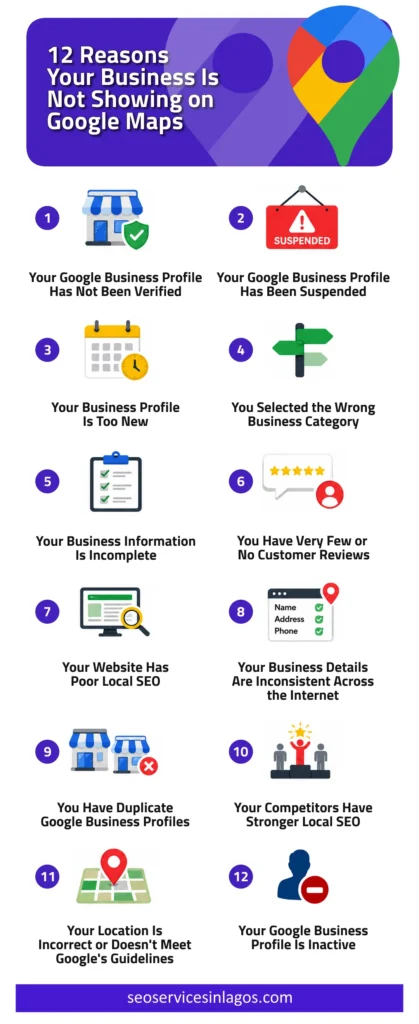
1. Your Google Business Profile Has Not Been Verified
Creating a Google Business Profile does not automatically make it visible to customers. Google must first verify that your business is legitimate.
Until verification is complete, your profile may not appear publicly or may have limited visibility.
Two signs this is the problem are;
- Your profile shows “Pending verification.”
- You recently created the profile.
Complete Google’s verification process as soon as possible.
Once verification is complete, Google can begin displaying your listing in both Search and Maps.
2. Your Google Business Profile Has Been Suspended
Google regularly removes or suspends listings that violate its guidelines.
Sometimes businesses do not even realise their profile has been suspended until customers mention they cannot find them online.
Common reasons Google suspends your business profile include:
- Keyword stuffing your business name
- Using a virtual office incorrectly
- Listing an ineligible address
- Creating duplicate profiles
- Providing inaccurate business information
- Violating Google’s quality guidelines
When a profile is suspended, it disappears from search results regardless of how much SEO work you’ve done.
Review Google’s guidelines carefully, correct any violations, and submit a reinstatement request if necessary.
3. Your Business Profile Is Too New
If you’ve only just created your listing, patience is important.
Google needs time to verify your information, review your profile, index your listing, and compare your details with other trusted online sources.
New businesses often expect to appear immediately. However, Google may take several days or even weeks before displaying a new profile consistently.
During this period, continue improving your listing instead of waiting passively.
Upload high-quality photos, add services, write a detailed business description, complete every available field, add your website, and encourage your first customer reviews.
These improvements help strengthen your Google Maps visibility once your profile becomes fully established.
4. You Selected the Wrong Business Category
Your primary business category is one of Google’s strongest ranking signals.
It tells Google exactly what your business does.
For example, if you run a law firm in Lagos but select “Business Management Consultant” instead of “Law Firm”, or another category that accurately reflects your legal services, Google may struggle to understand which searches your business should appear for.
As a result, your firm could miss opportunities to rank for searches such as “law firm in Lagos,” or say “property lawyer in Lagos.”
Similarly, if a restaurant selects “Coffee Shop” instead of “Restaurant,” it could miss valuable opportunities.
Google compares businesses within the same category.
Choosing the wrong category means you’re competing in the wrong market while reducing your relevance for your actual services.
5. Your Business Information Is Incomplete
Google prefers businesses that provide complete, accurate, and up-to-date information because it creates a better experience for users. An incomplete profile makes it harder for Google to determine whether your business is trustworthy and relevant to a search.
If your Google Maps listing is missing essential information, your visibility can suffer.
Many business owners only fill in their business name and address. However, every completed section provides Google with more context about your business.
6. You Have Very Few or No Customer Reviews
Reviews are one of the strongest trust signals in Google Maps SEO.
Imagine two businesses offering the same service.
The first has 2 reviews and a 3-star rating.
While the second has 185 reviews, a 4.9-star rating, recent customer feedback, and business owner responses.
Which one would you choose?
Google asks the same question.
Businesses with more high-quality reviews often receive greater visibility because reviews help Google understand that real customers have positive experiences with the business.
However, it is not just the number of reviews that matters.
Google also considers overall rating, review quality, review frequency, and keywords naturally mentioned in reviews.
Never buy fake reviews.
Google has become increasingly effective at identifying suspicious review patterns. Fake reviews can damage your credibility and even lead to profile restrictions.
Instead, focus on consistently delivering excellent customer experiences that naturally generate positive reviews.
7. Your Website Has Poor Local SEO
Your website plays a significant role in supporting your Google Maps ranking.
Google uses your website to verify what your business does, where it operates, and whether it deserves to rank above competitors.
If your website lacks strong local SEO, your profile may struggle to gain visibility.
For example, if you’re a real estate agent who wants to rank for searches like “real estate agent in Lekki”, your website should have a dedicated, well-optimised page targeting that location and service.
Likewise, if you operate in multiple areas such as Ikoyi, Victoria Island, Ikeja, and Ajah, you should create separate location pages for each area instead of relying on a single generic “Real Estate Services” page.
This helps Google understand where you operate and improves your chances of appearing in local search results for buyers and sellers in each location.
Implementing structured data, particularly Local Business Schema, helps search engines understand important details about your business, such as business name, address, phone number, opening hours, and others.
Although schema alone won’t guarantee higher rankings, it strengthens Google’s understanding of your business and supports your Google Maps optimisation efforts.
8. Your Business Details Are Inconsistent Across the Internet
Consistency is essential for local SEO.
Google compares your business information across numerous online sources before deciding how much confidence it should have in your listing.
These sources include business directories, social media profiles, industry websites, local directories, your website, and review websites.
If your business details differ across these platforms, Google may become less confident that all the information refers to the same business.
This issue is commonly known as inconsistent NAP.
NAP stands for Name, Address, Phone Number.
Here’s an example.
Your website says:
Tranquil Touch Spa
25 Admiralty Way, Lekki Phase 1, Lagos
Your Facebook page says:
Tranquil Touch Wellness Spa
Your Google Business Profile says:
Tranquil Touch Spa & Wellness Centre
Another online business directory lists:
25A Admiralty Road, Lekki Phase 1, Lagos
Although these differences may seem minor, they can confuse search engines and reduce Google’s confidence that all the listings belong to the same business.
Every accurate mention of your business online is known as a local citation.
Quality local citations help Google verify that your business is genuine and operates at the stated location.
Examples include reputable business directories, local chambers of commerce, professional associations, and industry-specific directories.
When your information is consistent across these sources, Google gains greater confidence in your business, which can improve your Google Maps ranking.
9. You Have Duplicate Google Business Profiles
Having more than one Google Business Profile for the same business can confuse both Google and potential customers.
Duplicate listings often occur when:
- You create a new profile instead of updating an existing one.
- Different employees create separate listings.
- Your business moves to a new location.
Google automatically generates an unclaimed listing from information it finds online.
A previous marketing agency created another profile.
When Google detects duplicate listings, it may split your reviews, divide your ranking signals, or suppress one or both profiles. As a result, your Google Maps visibility can decline significantly.
10. Your Competitors Have Stronger Local SEO
Sometimes, there is nothing technically wrong with your business profile.
The real issue is that your competitors have invested more time and effort into Google Maps SEO.
Google doesn’t simply decide whether your business deserves to appear. It also compares your business with every other relevant business in your area.
If competing businesses have stronger local signals, they are more likely to rank above you.
Even if you offer a better service, Google can only evaluate the information it sees online.
11. Your Location Is Incorrect or Doesn’t Meet Google’s Guidelines
Your business address plays an important role in Google Maps ranking.
If your address is inaccurate, difficult to verify, or doesn’t comply with Google’s policies, your listing may not appear for relevant searches.
Google distinguishes between two main business types:
- Storefront businesses – These businesses serve customers at their physical location. Examples include restaurants, salons, clinics, retail shops, etc. These businesses can display their address publicly.
- Service-area businesses – These businesses travel to customers instead of serving them at a fixed location. Examples include plumbers, electricians, cleaning companies, etc. These businesses can define service areas instead of displaying a public address.
Your profile may struggle to rank if:
- Your pin is in the wrong location.
- Your address cannot be verified.
- You use a virtual office that doesn’t meet Google’s guidelines.
- You hide your address when you shouldn’t.
- You display an address when you should instead configure your business as a service-area business.
12. Your Google Business Profile Is Inactive
Google rewards businesses that demonstrate they are active and engaged.
Many business owners create a profile, verify it, and then never update it again.
Months pass without new photos, business updates, customer review responses, updated services, or holiday opening hours.
Meanwhile, competitors continue improving their listings every week.
Google prefers businesses that provide fresh and relevant information because it enhances the user experience.
An active profile sends positive engagement signals to Google while giving potential customers confidence that your business is operating.
FAQs About Google Map Listings
How do I get my business on Google Maps?
Start by creating and verifying your Google Business Profile. Then complete every section of your profile, upload photos, add your services, encourage customer reviews, optimise your website, and build consistent local citations.
Can my business appear on Google Maps without a website?
Yes.
A verified Google Business Profile can appear on Google Maps even if you don’t have a website.
However, businesses with professionally optimised websites often perform better because Google has more information to evaluate. A website also increases customer trust and supports your overall Google Maps SEO strategy.
What is the difference between Google Maps SEO and Local SEO?
Google Maps SEO focuses specifically on improving the visibility of your Google Business Profile within Google Maps and the Local Pack.
Local SEO is broader.
It includes optimising your website, building local citations, earning backlinks, creating location-specific content, improving technical SEO, and strengthening your overall online presence.
The two strategies work together to improve your local search visibility.
Final Thoughts
If your business is not showing on Google Maps, don’t assume Google has ignored your business. The businesses that consistently rank in Google’s Local Pack don’t get there by accident. They invest in maintaining an accurate Google Business Profile, collecting genuine customer reviews, improving their websites, building authoritative local citations, and continually strengthening their online presence.
If you want your business to attract more local customers, now is the time to take action. Contact SEO Services in Lagos today for a professional Local SEO audit and discover what’s preventing your business from appearing where your customers are searching.